
Heaton Stannington AFC Limited – Club Membership
As a Company Limited by Guarantee, Heaton Stan does not have “shares” or “shareholders.” Instead, it is run for the benefit of and supported by its members.
As a member over the age of 18, you get a vital say in important matters. You hold full voting rights at our Annual General Meeting (AGM) and any Extraordinary General Meetings (EGMs), giving you the power to vote on proposed governance changes and elect the Board of Directors.
Membership is open to everyone without discrimination and the Board fixes all fees on a fair basis to hopefully ensure costs never pose a significant obstacle to joining.
While there is no maximum cap on our number of members, all applications are subject to formal approval by the Directors or an appointed management committee. Membership can be refused or removed only for a good cause with any affected person holding a right to appeal the decision through the Secretary
Under our Articles of Association, each Member provides a nominal guarantee of £10. This is the maximum amount you would be liable to contribute toward the club’s debts, but only in the unlikely event that the club is wound up while you are a Member (or within one year of your membership ceasing). This is a standard legal protection for non-profit sports clubs.
Your annual membership fee is invested directly into the Club – used for facilities maintenance and helping us to keep bar prices as low as possible. We encourage everyone to become a full legal member of the Club and play a role in our future. By providing your email address upon signing up, you explicitly consent to receiving all formal club correspondence, financial updates, and official member communications electronically via email.
You can become a member of Heaton Stannington AFC Limited in two ways:
- By visiting the Clubhouse and asking for/completing a membership form.
- By purchasing your membership online – see below.
Once your membership has been processed, your membership card will be available for collection in the Clubhouse. All membership requests are submit to vetting by the Board of Directors before acceptance. Production of your membership card indicates acceptance.
JOIN ONLINE:
HEATONSTAN.CO.UK/JOIN
Step-by-step guide for online purchases
Select Heaton Stannington Club Membership:

Click Add to Basket. If you wish to process multiple memberships at the same time, click Add to Basket the relevant number of times.

The Basket icon in the top right will show the number of memberships you are going to purchase. When ready, click on the icon and it will take you to the Basket:
Check the number of memberships is correct (you can click the little bin icon next to them if you have added too many). Scroll to the bottom right and click Proceed to Checkout.
A login screen will pop up. If you have previously been a Member (or are a Juniors parent) you will already have a login here. If not, you will need to click Create Account the first time.
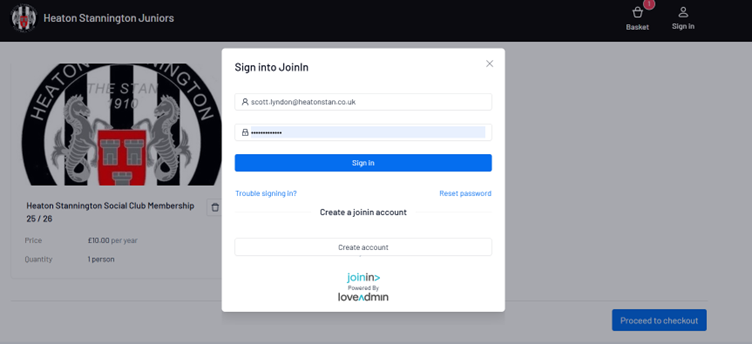
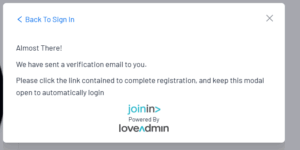
On the form that follows fill in your details ensuring all fields with a red star are completed and the Privacy Policy box is ticked. Click Register. You will see the below box and will now need to check your email for an email which contains a verification link.
Note: some email clients may send this to Junk/Spam folders so be sure to check if you cannot locate it in your Inbox!
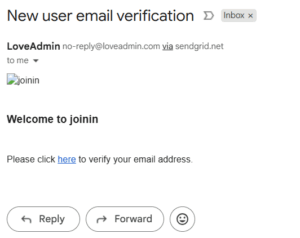
The email looks like this:
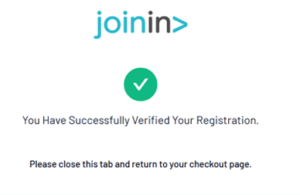
When you click here to verify your email, you will see the below confirmation. You can now return to the LoveAdmin website to continue your membership:
You will be back on the Basket page and will need to click Proceed to Checkout again. This time you will already be logged in and see the below payment screen:

If you are only buying one membership for yourself, you will just need to select your name under Select a person. If you are buying for multiple people and the other people are now shown, click “Add a new person” to add them to the list and select them.
Click Continue when ready.
You will then need to click on Enter Payment Details:

You can then enter your card details to complete payment. Once you have completed the payment process via Paypal, you will see the following confirmation screen. Click Complete Checkout.

Your membership application has now been submitted. Once validated and approved, your membership card will be available for collection behind the bar.